
I recently moved my git repositories off GitHub and onto a self-hosted Forgejo instance running on a Hetzner VPS. The whole thing costs €4.49/month and took an afternoon to set up.
In this post I’ll walk through the deployment, the reasoning behind it and migration steps. This is meant as inspiration, not a batteries-included guide. Adapt it to your own needs.
Why migrate?
This is unfortunately just as much a story of emigrating as it is immigrating.
1. GitHub has been taking a turn for the worse.
- Service reliability has become awful. Fighting the platform instead of my bad workflows is pain.
- Copilot/AI is crammed into everything. New data policies are opt-out instead of opt-in.
- They even started putting ads in PRs
2. With the current geopolitical situation I want to reduce my reliance on services based outside of Europe. The landscape for GitHub-like services in Europe is unfortunately quite limited. Codeberg would have been a good option, but it only permits open source projects. If someone were to start offering cheap hosted forgejo instances, or a reputable public instance with more permissive rules I would be a customer.
3. Forgejo is a great git service, and it is a lot of fun to host it myself.
It is lightweight, predictable, free as in freedom, and it does just what I need it to.
Forgejo Actions also allow me to migrate without re-engineering too much (more on that later).
I will still be using GitHub for collaborating on others’ projects, but all of mine now live at git.torbjorn.dev.
Design choices
Before diving into configs, a word on the philosophy behind this setup.
Artisanal infrastructure: Using IaC to manage the platform that hosts your IaC is a nice chicken & egg problem and a major footgun. Manual setup and administration is hence the most sane approach.
Optimizing for simplicity and low maintenance: Single server, SQLite, automated upgrades, no clustering, no Kubernetes. The goal is to have something I can set up in an afternoon and forget about for months.
Boring software: I picked every component for being stable, well-documented, and predictable. Exciting tools make exciting troubleshooting.
The server
The instance runs on a Hetzner CX23 with Ubuntu 24.04. Hetzner is European, cheap, reliable, and has excellent network connectivity. At €4.49/month you get 2 vCPUs, 4GB RAM and 40GB disk. It is more than enough for this Forgejo instance.
SSH configuration
The server will be exposed to the internet and I want administration access to be as simple as possible while still staying secure. I opted to disable root login and force ssh-key auth.
Forgejo needs port 22 for Git over SSH, so SSH administration access is moved to port 2222 instead.
# /etc/ssh/sshd_config
Port 2222
PermitRootLogin no
PasswordAuthentication no
The docs mention SSH passthrough as a possible way to get around the overcrowded port, but that’s an extra thing to get wrong. Keep It Stupid Simple.
Service user
To run Forgejo in a user context with rootless Podman I need to create a service user with a home folder and lingering enabled. Lingering makes systemd start a user session and associated services upon boot instead of a user triggering it through login.
useradd --create-home --shell /bin/bash forgejo
loginctl enable-linger forgejo
To harden the service account I lock the password to prevent interactive logins through regular means.
Setting the user’s shell to /usr/bin/nologin is usually preferred, but this prevents running systemd units as the user.
passwd --lock forgejo
You can still access the user session via machinectl. This drops you into the forgejo user’s environment with a proper login session, PAM, and all systemd user units visible.
machinectl shell forgejo@
Automated upgrades
The container image is pinned to a major version (forgejo:14). Podman’s auto-update timer periodically checks for new images matching the tag and restarts the container if one is found. This means patch and minor releases are installed automatically without risking breaking changes:
systemctl --user enable --now podman-auto-update.timer
For automated OS-level patches I enable unattended-upgrades with dpkg-reconfigure unattended-upgrades.
I also elected to enable automatic reboots in /etc/apt/apt.conf.d/50unattended-upgrades:
Unattended-Upgrade::Automatic-Reboot "true";
The timing is controlled by two systemd timers: one for downloading packages and one for installing them. I set downloads at 02:00 and upgrades at 03:00:
# systemctl edit apt-daily.timer
[Timer]
OnCalendar=02:00
RandomizedDelaySec=300

# systemctl edit apt-daily-upgrade.timer
[Timer]
OnCalendar=03:00
RandomizedDelaySec=300
Between podman auto-update and APT unattended-upgrade the whole stack stays current without logging in.
Container setup with Podman Quadlet
I chose Podman over Docker for a few reasons: no daemon running as root, rootless containers out of the box, and native systemd integration. It’s also included in Ubuntu’s default repos, so there’s no third-party repository to maintain.
Quadlet is Podman’s native integration with systemd. Instead of writing systemd unit files by hand or using podman generate systemd, you drop declarative .container, .network, and .volume files into ~/.config/containers/systemd/ and systemd picks them up. It’s the cleanest way to run rootless containers as services.
The container unit
# forgejo.container
[Container]
ContainerName=forgejo
Image=codeberg.org/forgejo/forgejo:14
Network=forgejo.network
PublishPort=127.0.0.1:3000:3000
PublishPort=22:22
Volume=forgejo-data:/data
Volume=%h/.config/containers/systemd/forgejo-config.ini:/data/gitea/conf/app.ini:Z
Volume=%h/.config/containers/systemd/forgejo-templates:/data/gitea/templates:ro,Z
Volume=%h/.config/containers/systemd/forgejo-public:/data/gitea/public:ro,Z

EnvironmentFile=%h/.config/containers/systemd/forgejo.env

[Service]
Restart=always

[Install]
WantedBy=default.target
A few things to note:
- Port 3000 is only exposed on localhost (
127.0.0.1:3000). Nginx handles TLS termination and proxies to it — there is no reason to expose the HTTP port to the world. - Port 22 is exposed on all interfaces for direct git-over-SSH access.
- The config file is bind-mounted into the container at Forgejo’s expected path. The
%hvariable expands to the user’s home directory. - Templates and public assets are mounted read-only for custom landing page and branding.
- Secrets are injected via the environment file, not baked into the config.
Network and volume
These are about as minimal as it gets:
# forgejo.network
[Network]
NetworkName=forgejo

# forgejo-data.volume
[Volume]
VolumeName=forgejo-data
The named volume gives us persistent storage for repositories, the database, and uploads. The dedicated network provides isolation.
Forgejo configuration
The full config is in the repo, but here are the interesting parts.
Database
[database]
PATH     = /data/gitea/gitea.db
DB_TYPE  = sqlite3
LOG_SQL  = false
Is it interesting if it is the default? I’m using SQLite for the database. Single file, no separate database container, backup is just a file copy. If I ever needed to scale this I’d switch to PostgreSQL, but for a single-user forge SQLite is perfect and one less thing to maintain.
[mailer]
ENABLED  = true
PROTOCOL = smtp+starttls
SMTP_ADDR = smtp.mailbox.org
SMTP_PORT = 587
FROM     = noreply@git.torbjorn.dev
; USER and PASSWD injected via forgejo.env
Mailbox.org handles SMTP. Credentials are injected via environment variables rather than stored in the config file.
Security and registration
[service]
DISABLE_REGISTRATION           = false
REGISTER_MANUAL_CONFIRM        = true

[openid]
ENABLE_OPENID_SIGNIN = false
ENABLE_OPENID_SIGNUP = false
Registration is open but requires manual admin approval. I want to be able to invite people without being a bot magnet. Not to mention the implications of people getting RCE through Forgejo Actions by simply registering.
I don’t see the need for OpenID for my use.
Feature configuration
[repository]
DEFAULT_PRIVATE = private
MAX_CREATION_LIMIT = 0

[service]
DEFAULT_ALLOW_CREATE_ORGANIZATION = false


[attachment]
MAX_SIZE = 20
I have disabled repo & org creation for registered users, but they can fork existing repos. The goal is to only have my own/approved projects on the instance while still allowing collaborators to contribute through forks. Users can in theory fork one of my repos, push what they want to it and rename it, but this config should be a solid “nudge” towards intended behavior.
[federation]
ENABLED = false

[mirror]
ENABLED = false

[picture]
DISABLE_GRAVATAR = true

[time]
ENABLE_ISSUE_TIME_TRACKING = false
The remaining feature configuration is about removing features I don’t want/need.
Federation is cool but the functionality is just not quite there yet. I will enable it if/when the ActivityPub integration allows for meaningful interaction across federated instances.
Custom templates
Forgejo supports template overrides by mounting files into /data/gitea/templates/. I use this for a custom landing page and analytics.
The landing page replaces the default Forgejo landing page for unauthenticated visitors:
<!-- home.tmpl -->
{{template "base/head" .}}
<style>
  .landing {
    display: flex;
    flex-direction: column;
    align-items: center;
    justify-content: center;
    min-height: 80vh;
    text-align: center;
  }
  .landing img {
    max-width: 700px;
    width: 90%;
    border-radius: 8px;
  }
  .landing h1 {
    margin-top: 1.5rem;
    font-size: 2rem;
  }
</style>
<div class="landing">
  <img src="/assets/img/landing.webp" alt="Nordlandsbåt">
  <h1>Hopp oppi!</h1>
</div>
{{template "base/footer" .}}
Visitors are greeted with an image of a Nordlandsbåt and a “Hopp oppi!” (“Jump in!”) in Norwegian. Much better than the default Forgejo advertisement.
For analytics I inject a Plausible script via a custom header template:
<!-- custom/header.tmpl -->
<script defer data-domain="git.torbjorn.dev"
  src="https://plausible.io/js/script.js"></script>
Secrets and bootstrapping
Secrets are kept out of the config file entirely. Forgejo supports environment variable overrides using the FORGEJO__section__key naming convention, so the env file looks like this:
FORGEJO__security__SECRET_KEY=...
FORGEJO__security__INTERNAL_TOKEN=...
FORGEJO__oauth2__JWT_SECRET=...
FORGEJO__mailer__USER=...
FORGEJO__mailer__PASSWD=...
The install.sh script in the repo generates these on first run:
SECRET_KEY=$(openssl rand -hex 32)
INTERNAL_TOKEN=$(openssl rand -hex 32)
JWT_SECRET=$(openssl rand -base64 32)

read -rp "SMTP username (email): " SMTP_USER
read -rsp "SMTP password/app password: " SMTP_PASSWD

cat > "$DEST/forgejo.env" <<EOF
FORGEJO__security__SECRET_KEY=${SECRET_KEY}
FORGEJO__security__INTERNAL_TOKEN=${INTERNAL_TOKEN}
FORGEJO__oauth2__JWT_SECRET=${JWT_SECRET}
FORGEJO__mailer__USER=${SMTP_USER}
FORGEJO__mailer__PASSWD=${SMTP_PASSWD}
EOF
chmod 600 "$DEST/forgejo.env"
Three crypto secrets via openssl rand, SMTP credentials prompted interactively, file mode 600. Is this HashiCorp Vault? No. Is it good enough for a single-user server? Absolutely.
Nginx reverse proxy
Nginx sits in front of Forgejo as a reverse proxy and handles TLS termination. Certbot takes care of certificates, the HTTPS listener, and the HTTP→HTTPS redirect:
certbot --nginx -d git.torbjorn.dev -d git.torbjornbang.no
That leaves us with just the proxy configuration to write:
server {
    server_name git.torbjorn.dev git.torbjornbang.no;
    client_max_body_size 512M;

    location / {
        proxy_pass http://127.0.0.1:3000;
        proxy_set_header Host $host;
        proxy_set_header X-Real-IP $remote_addr;
        proxy_set_header X-Forwarded-For $proxy_add_x_forwarded_for;
        proxy_set_header X-Forwarded-Proto $scheme;
        proxy_http_version 1.1;
        proxy_set_header Upgrade $http_upgrade;
        proxy_set_header Connection "upgrade";
    }

    # TLS and redirect managed by Certbot
}
The Upgrade and Connection headers enable WebSocket passthrough, which Forgejo uses for live log streaming in Actions. The REVERSE_PROXY_LIMIT = 1 in Forgejo’s config tells it to trust the proxy headers from exactly one hop.
Firing it up
With all the pieces in place, starting the forge is anticlimactic:
systemctl --user daemon-reload
systemctl --user start forgejo.service
Once it’s running, create your admin account:
podman exec --user git forgejo forgejo admin user create \
  --admin --username <name> --email <email>
Open https://git.torbjorn.dev, log in, and you’re up & running.
Once you have logged in you should create yourself a non-admin account and hide the admin under its profile settings. You will also have to edit your regular user under site administration to allow it to create repos and orgs.
MFA is a must these days for both your regular account and your admin account. Add your git keys etc. and you’ll be pushing code in no time.
Backups
Since I chose SQLite, the entire forge state lives in a single Podman volume. That makes backups straightforward but also means there’s exactly one thing you really can’t afford to lose.
I run two layers:
- Hetzner Cloud Backups. Enabled in the server settings — daily snapshots with 7-day retention. This covers the entire VM including OS config, Nginx, and certbot state. It’s the “everything is on fire” recovery option at €0.90/month.
- rclone to separate backup storage. A daily cron job syncs the Forgejo data volume to separate backup storage. If the database gets corrupted or I fat-finger a config change, I can restore just the data without restoring the whole server.
# crontab -e
0 4 * * * rclone sync ~/.local/share/containers/storage/volumes/forgejo-data/ backup:forgejo-backup/$(date +\%Y-\%m-\%d)/
Is this “3-2-1 rule” compliant? No. It is however sufficient for my use.
Migrating from GitHub
Forgejo has a built-in migration feature that can import repos directly from GitHub, including issues, pull requests, labels, milestones, and releases. If you need to preserve that metadata, use it — it’s the right tool for the job.
I found it to be a bit cumbersome for my use:
- It works one repo at a time through the web UI
- It only handles the import.
For my migration I only needed the git history as there are no issues or PRs worth preserving. I also wanted to batch-migrate everything, verify the results, leave proper “moved to” notices on GitHub, and clean up afterwards. So I got Devstral to write me a script.
The script implements a four-step process: migrate → verify → mark → delete
Usage: ./migrate.sh {migrate|verify|mark|delete}
The full script is in git.torbjorn.dev/torbbang/github-forgejo-migrate.
Step 1: Migrate. The script uses gh repo list to enumerate all repos (excluding public forks), creates each one on Forgejo via the API, then does git clone --mirror from GitHub and git push --mirror to Forgejo — both over SSH for speed and full history fidelity.
Step 2: Verify. Compares default branch names, HEAD commit SHAs, and total branch counts between GitHub and Forgejo. If anything doesn’t match, you know before you start deleting.
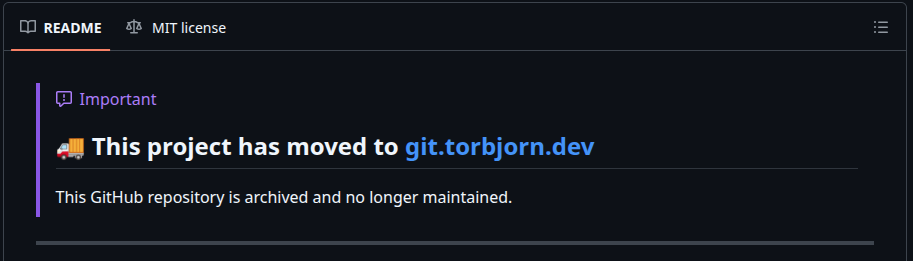
Step 3: Mark. For public repos: updates the GitHub description with a “moved to” link, prepends a migration banner to the README, and archives the repo. This way anyone who finds the old GitHub repo gets pointed to the right place.
Step 4: Delete. For private repos only — since they can’t be archived with a redirect. The script verifies every private repo exists on Forgejo first, then requires you to type DELETE ALL PRIVATE REPOS to confirm. No accidental deletions.
NOTE: This has been tested once with only one version of forgejo. I will not be maintaining it. Use it at your own risk.
CI/CD with Forgejo Actions
Spinning up a runner
To be able to run Forgejo actions you need a runner that is separate from your forgejo instance. I had a spare laptop lying around so I put it to work with Docker Compose.
Unlike the forgejo container the runner needs privileged access one way or another to be able to run workflows. For docker this is in the shape of a privileged DIND container, for podman I would have run a privileged “sidecar” podman container. The choice landed on Docker as DIND is battle tested and much less exciting than the podman option.
Docker compose file:
# runner-compose.yml
services:
  docker-in-docker:
    image: docker:dind
    container_name: 'docker_dind'
    privileged: true
    command: ['dockerd', '-H', 'tcp://0.0.0.0:2375', '--tls=false']
    restart: 'unless-stopped'

  volume-init:
    image: 'data.forgejo.org/forgejo/runner:11'
    container_name: 'volume_init'
    user: root
    volumes:
      - runner-data:/data
    command: chown -R 1001:1001 /data

  runner:
    image: 'data.forgejo.org/forgejo/runner:11'
    depends_on:
      docker-in-docker:
        condition: service_started
      volume-init:
        condition: service_completed_successfully
    container_name: 'runner'
    env_file: .env
    environment:
      DOCKER_HOST: tcp://docker-in-docker:2375
    user: 1001:1001
    volumes:
      - runner-data:/data
    restart: 'unless-stopped'
    command: >-
      /bin/sh -c '
        if [ ! -f /data/.runner ]; then
          forgejo-runner register --no-interactive
            --instance "$$FORGEJO_URL"
            --token "$$FORGEJO_TOKEN"
            --name runner
            --labels docker:docker://node:20-bookworm;
        fi &&
        forgejo-runner daemon
      '

volumes:
  runner-data:
This is a slightly modified version of the compose file in the forgejo docs. I don’t like volume mounts, so I am using a docker volume and an init container that sets the correct permissions. I am also not a fan of the proposed workflow of launching a shell in the container post-startup to register it, so it registers using values from an env file before starting the daemon. The env file looks like this:
FORGEJO_URL=https://git.torbjorn.dev
FORGEJO_TOKEN=<your-runner-token>
With these in place you can run docker compose up -d and you’re in business.
Adapting GitHub workflows
This is one of the major boons with Forgejo. Forgejo Actions workflows are largely compatible with GitHub Actions. Same YAML syntax, same workflow structure, same runs-on concept. Most simple workflows work with minimal changes.
The things you’re likely to need to adjust:
1. Runner labels
Your workflows reference labels defined when registering the runner, not GitHub’s ubuntu-latest. In my case the runner is tagged docker, so all runs-on: ubuntu-latest became runs-on: docker.
2. Workflow directory
Move your workflows from .github/workflows/ to .forgejo/workflows/.
3. Action sources
By default, Forgejo resolves action references from its own instance or data.forgejo.org, not GitHub. Common actions like actions/checkout are mirrored on data.forgejo.org, but most third-party actions are not. You have three options:
- Use full GitHub URLs in your
uses:lines:uses: https://github.com/hashicorp/setup-terraform@v3 - Set
DEFAULT_ACTIONS_URL = githubin your Forgejoapp.iniso all unresolved actions fall through to GitHub automatically - Mirror the actions you need as repos on your own instance
I went with option 1 for the handful of actions I use. Option 2 is less maintenance if you use many actions.
4. Node.js in custom containers
If your job runs in a custom container (via the container: directive), that container needs Node.js installed before any action steps run. Actions like actions/checkout are Node.js programs, and they will fail if node isn’t on the PATH. I had to move my Node.js install step before the checkout step to fix this.
5. Missing tools
The default runner image (node:20-bookworm) is more minimal than GitHub’s hosted runners. Tools like jq and curl may not be present. Add install steps for what you need.
6. Secrets and variables
Re-create them in the Forgejo repo or organization settings. The syntax (${{ secrets.FOO }}, ${{ vars.BAR }}) is identical.
7. GitHub-specific features
The github.token permissions model, environment protection rules, and some webhook events may differ or not exist yet.
If your workflows are straightforward build-and-deploy pipelines, the migration is painless. If you have complex integrations with GitHub’s ecosystem, expect to spend some time adapting.
Summary
A self-hosted git & CI/CD platform for under €5/month, set up in an afternoon and migrated in an evening. Your setup will look different, but hopefully this gives you a starting point. The deployment config and migration script are both available:
Hopp oppi!
See Also
- EVE-NG Netplan configuration 🌐🙆
- Ubuntu, SecureCRT & Telnet links 🐧🔗
- Gleaning DNS resolver behavior 🕵️
- Tuning Vibe CLI for Network Engineering 🔧🌐
- Building your own Containerlab node kinds 🛠️
Got feedback or a question?
Feel free to contact me at hello@torbjorn.dev